Excel automation for manufacturing quality plans
Quality plan automation
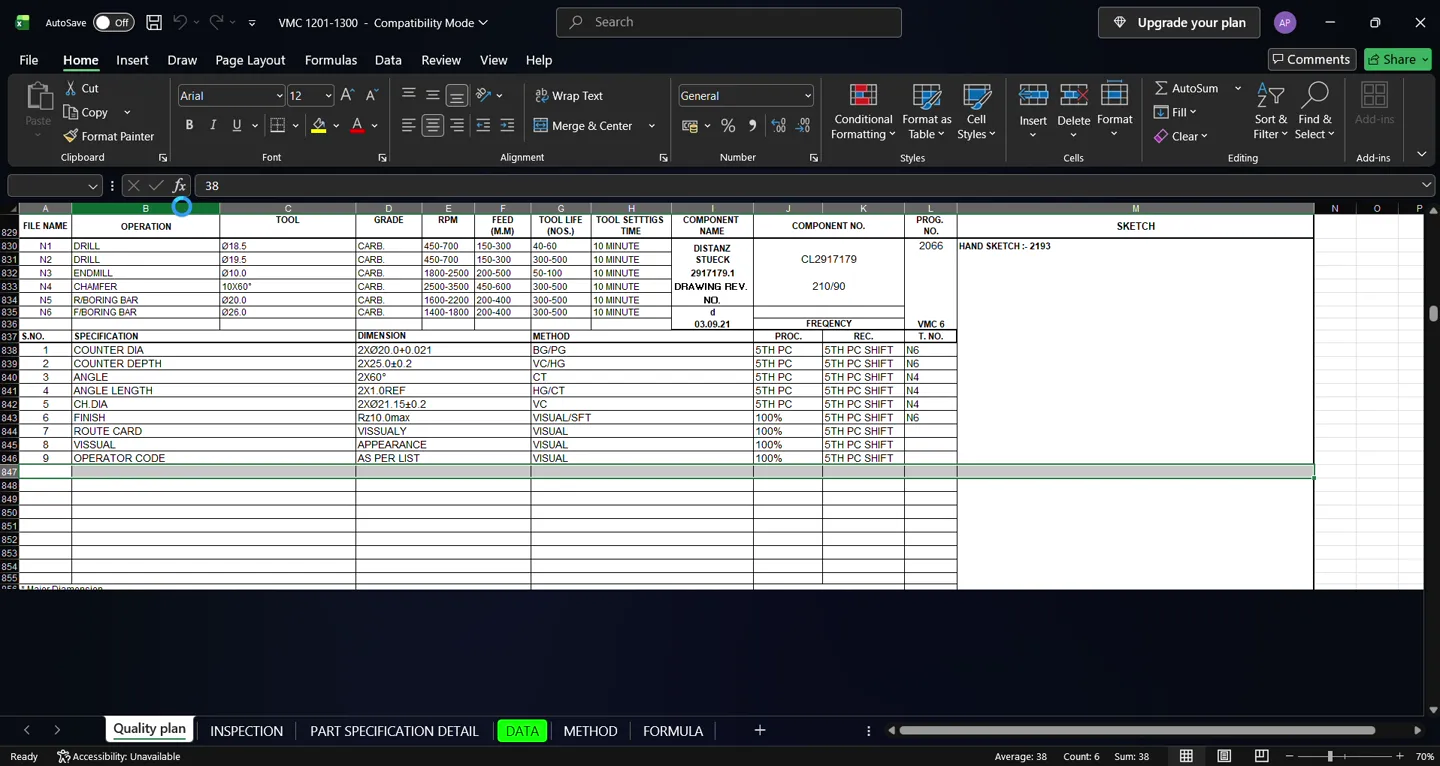
A machining unit keeps one Excel workbook per series of parts, with a separate Quality Plan for every component — operations, tools, dimensions, inspection methods, frequency and a drawing sketch. When the quality team introduced new mandatory checks, such as whether a part can be loaded upside down and whether that is poka-yoke protected, every plan in every workbook needed updating.
- Excel
- Automation script
- Year
- 2026
- Role
- Automation development
- Team
- Client project
(01)The challenge
Each workbook holds around 100 plans, and every plan has a different number of inspection rows. Adding the new checks by hand meant finding the last row of each plan, inserting lines, continuing the serial numbers and copying the right method and frequency — slow, boring work where one missed plan fails an audit.
(02)The solution
An Excel automation that walks through the workbook plan by plan, finds where each plan's inspection list ends, adds the new check rows with the next serial numbers and the correct method (visual, YES/NO) and frequency (at setting), and keeps the layout, sketch and approval block untouched.
(03)Features
What it does.
Finds each plan automatically
Detects where every Quality Plan starts and where its inspection list ends.
Correct serial numbers
New rows continue each plan's own numbering, whether it has 5 rows or 38.
Keeps the format
Layout, sketches, process flow and approval sections stay exactly as they were.
Reusable
The same run works for every workbook in the series, and for future checks.
(04)Screens
A closer look.
(05)Process
How it came together.
Discover
Understanding the goal: each workbook holds around 100 plans, and every plan has a different number of inspection rows.
Design
Structure, key screens and the look agreed before any code was written.
Build
Developed with Excel, Automation script — fast, responsive and maintainable.
Launch
Tested on real phones and desktops, then deployed to production.
Improve
Fixes, refinements and new features based on how people actually use it.
(06)Under the hood
Highlights
- ✦100 quality plans updated per workbook in one run
- ✦Every plan updated the same way, ready for audit
- ✦Works on the existing legacy .xls files
Architecture
- 01Excel workbook automation
- 02Plan detection by layout
- 03Row insertion with numbering
Services used
Tech stack
- Excel
- Automation script

Want something like this?
Tell us what you're building. We reply within 24 hours with honest advice and a clear next step.
Book a free call →